
TechServe Alliance sells memberships to companies, and their staff work from HubSpot. This is the implementer’s view of what WP Fusion does on their site and why we kept it when we built the rest of the integration ourselves.
By Vic Dorfman, founder of MemberFix. Reviewed November 2026.
This client spotlight was written by MemberFix and is published here with TechServe Alliance’s approval. memberfix.rocks


Client
Lori Fitzsimon
Managing Director of Membership, TechServe Alliance
TechServe Alliance sells membership to firms. A staffing company joins, and their people get access through the company’s membership. In HubSpot that means two kinds of record, the people and the companies they belong to, and TechServe’s staff work from both.
WP Fusion is how the people get there. When someone registers on TechServe’s site, WP Fusion creates their HubSpot contact if they don’t have one yet. After that it sends updates to the contact: name, email, role, billing address, company and job title, plus the membership’s status and plan name. From 10 August to 10 November 2026, its log, which keeps about three months, shows 79 new contacts created at registration and about 2,950 updates sent to HubSpot.
TechServe’s member lists and event registrations in HubSpot sit on those contact records. When we built custom code for companies, deals and invoices, we left the people with WP Fusion on purpose.
“responsive, collaborative, and willing to customize solutions to fit our needs”
Lori Fitzsimon, Managing Director of Membership, TechServe Alliance
#What is TechServe Alliance
TechServe Alliance is a US trade association for IT and engineering staffing and solutions firms.
Members are companies. The main site sells several programs, including a staffing firm membership, a supplier program, a premium compliance service and local chapter memberships. The same site also runs courses, an events calendar and the association’s store.
Alongside the main site, members use a separate online community for forums and groups, built on BuddyBoss.
MemberFix rebuilt the platform over 20 months, and in that move not one member had to re-subscribe or re-enter their payment details. That result belongs to the whole rebuild. The WP Fusion setup in this post is one part of it.
#What the association needed
Three things had to hold together.
- Company memberships, individual people. A firm buys the membership and adds their staff, and WooCommerce Memberships for Teams handles that on the WordPress side.
- Company records that stay current in HubSpot. TechServe’s staff work from those records, but there was no automated way to update them, so their team did it by hand.
- One identity across two sites. A member who logs in to the main site needs a matching account in the community, with the right access.
We chose WP Fusion’s native HubSpot integration before the migration, and it is what creates and updates TechServe’s contacts.
#Inside TechServe’s setup with WP Fusion
WP Fusion (the full plugin) runs on the main site and connects it to HubSpot. Its job here is the people: it creates contacts for new registrants and sends their updates.
#What WP Fusion sends to HubSpot
We use WP Fusion’s field map to connect member fields in WordPress to HubSpot contact properties. On TechServe the map covers:
- name and email
- the person’s role on the site, such as member or supplier
- website, and the billing street, city and state
- company name and professional title
- membership status and plan name
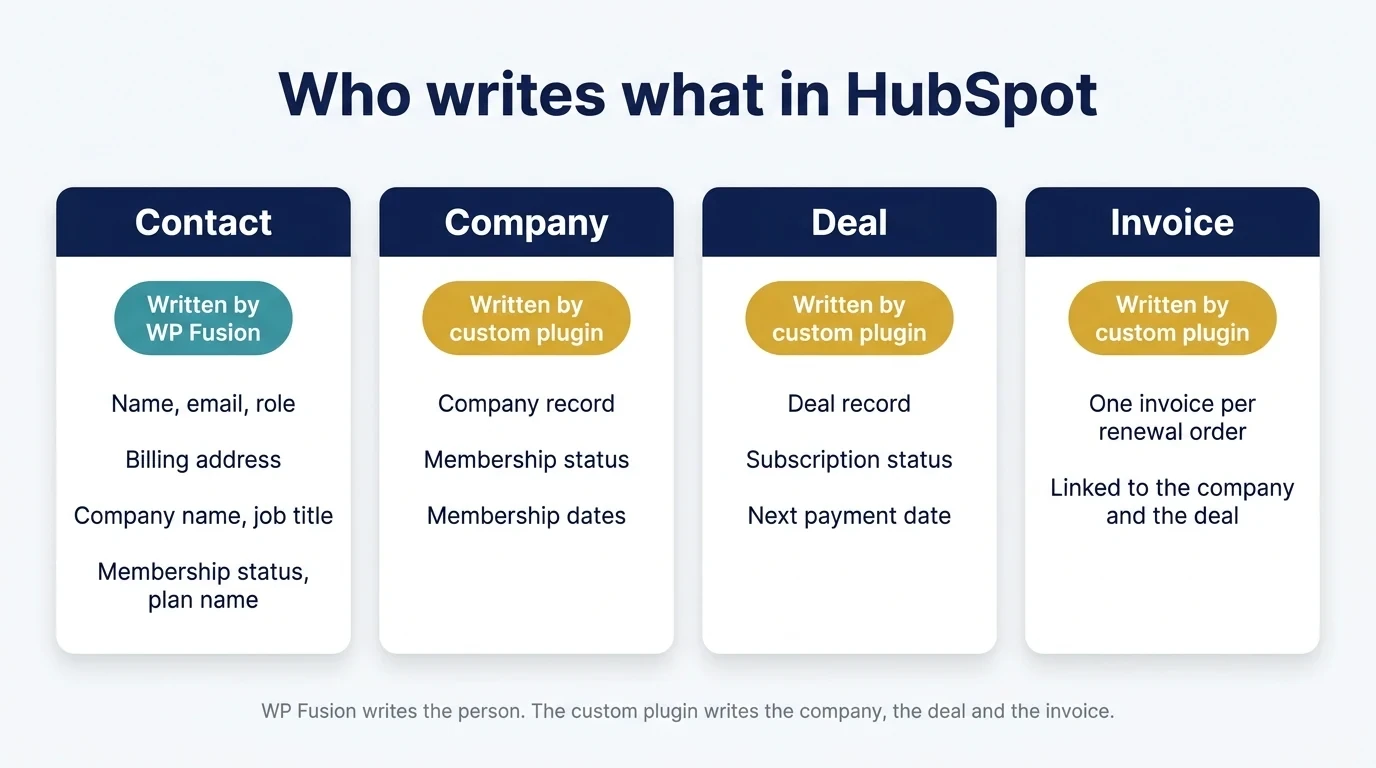
Company name is on that list, so WP Fusion writes the company name onto each person’s contact record. The separate HubSpot company, deal and invoice records come from our custom plugin, which we cover further down.
WP Fusion’s WooCommerce, WooCommerce Subscriptions and WooCommerce Memberships integrations are switched on, and the log shows membership status and plan name going out to HubSpot when a membership changes.
New members arrive the same way. When someone registers, WP Fusion looks for them in HubSpot and, if there is no contact yet, creates one. Contacts can also come from HubSpot forms or be added by hand.
That data moves one way, from WordPress to HubSpot. The only thing that comes back is HubSpot list membership, and nothing in WordPress uses it.
#What depends on those contact records
- Member lists. TechServe’s member, former-member, supplier and prospect lists are active HubSpot lists based on each contact’s associated company type, and TechServe’s staff maintain that type in HubSpot. They are lists of contacts, so a person has to be a contact first.
- Event registrations. TechServe’s team also uses HubSpot Events, and each registration is tied to a person’s contact record through their email address.
- Who someone is. Each contact carries the person’s role, so staff can tell members from suppliers in HubSpot.
#Content access
Most content access is handled by other plugins here. WooCommerce Memberships gates content by plan on the main site, WP Fusion’s content lock covers a few pages, and on the community site a member’s WordPress role decides access. If you mainly need a CRM connector, you can run WP Fusion this way and let other plugins handle the gating.
#Companies, deals and invoices: the plugin we built next to it
HubSpot has separate objects for contacts, companies, deals and invoices. WordPress holds the same information in its own places: a user is a person, a team in WooCommerce Memberships for Teams is a firm, and a WooCommerce subscription and its orders are what the firm pays for.
WP Fusion maps the first of those, WordPress users to HubSpot contacts. Its HubSpot Enhanced Ecommerce add-on can track WooCommerce sales as HubSpot deals, and TechServe’s site doesn’t run it. TechServe’s memberships belong to companies and are managed at the team level, so each HubSpot company record needs data from several WordPress objects. That called for TechServe-specific rules, so we built a custom plugin. It collects data from teams, subscriptions and orders and syncs it to HubSpot companies, deals and invoices, and it leaves contact sync to WP Fusion.
So the work splits three ways:
- WP Fusion syncs people, meaning contacts and contact properties, including company name.
- MemberFix’s custom plugin syncs companies, deals and invoices, including each company’s actual membership status (active, on hold, canceled or expired) and the relevant dates.
- WooCommerce Memberships, Teams and Subscriptions own the membership, the team and the billing.
In May 2025 we tried a different, general-purpose HubSpot plugin for the company side, not WP Fusion. About 90% of what it did met our requirements, but matching people to companies still took custom logic, because an action by one person sometimes has to update a shared company record. That’s why we began building our own plugin, with custom rules for when a company record should be created or updated and what should trigger or prevent that.
The plugin sends data from WordPress to HubSpot only. It reads HubSpot to find matching companies and deals, then stores their HubSpot IDs in WordPress.
In 2026 we didn’t change how the sync works overall, but we tightened a few of those rules:
- Only Staffing Firm Membership and Supplier Program subscriptions can update a company’s membership details, so a subscription for an add-on product can’t overwrite them. If a company has more than one subscription, the active one takes priority.
- The plugin keeps the date a membership actually lapsed, so a later cancellation date can’t overwrite it.
#Renewals and paused memberships
A normal renewal shows how the two fit together. When a renewal comes due, the subscription goes on hold and the membership pauses, with the reason recorded as a subscription renewal. WP Fusion’s subscription integration waits to see whether the renewal payment goes through before it acts. Our plugin queues a company and deal update, but it sends nothing to HubSpot yet. The renewal order is created in the same second, and the card gets charged about three seconds later. The subscription then goes back to active and the membership resumes, and WP Fusion logs that there is nothing to do.
About a minute later, our sync queue works through the pending updates. The plugin updates the HubSpot company record with the active status and next payment date, and it clears the termination and lapse dates. Next it updates the associated deal with the subscription status and next payment date. Finally it creates a HubSpot invoice for the renewal order and associates that invoice with both the company and the deal.
#The second site: a BuddyBoss community
The community lives on its own WordPress site, and the link between the two sites doesn’t involve HubSpot. WP Remote Users Sync, a free plugin, pairs them. The main site uses it to send logins, accounts, roles and nine membership fields, such as local chapter and membership status, to the community.
A member’s WordPress role decides their access to the community, and that role comes from their team’s membership status. On the main site, AutomatorWP assigns the role based on WooCommerce Memberships. An active Staffing Firm Membership makes someone a member, a canceled or expired one makes them a former member, and the Supplier Program makes them a supplier or former supplier, depending on membership status. WP Remote Users Sync then copies the role to the community. Anyone who isn’t a member or an administrator gets redirected to the main site’s login page, and after logging in they return to the community.
When someone loses the member role, a custom snippet removes them from all their groups.
WP Fusion isn’t active on the community site, and the community site doesn’t use HubSpot data. WP Fusion does have built-in support for WP Remote Users Sync, which adds a member’s HubSpot contact ID and lists to what gets sent, and the main site’s WP Fusion log shows those syncs going out. The community site doesn’t store them.
#How it changed things for TechServe
We don’t have a measured number for any of this, so we won’t invent one.
There used to be no automated way to update HubSpot company records, so TechServe’s team did it by hand. Now, when a renewal goes through, our plugin updates the company record and the deal and creates the invoice about a minute later. New members reach HubSpot as contacts through WP Fusion when they register, and WP Fusion sends their role and membership changes after that. WP Remote Users Sync copies accounts and roles from the main site to the community.
#Advice for associations with a similar setup
- Decide which facts belong on contacts, companies and deals for your membership model before you pick a connector. Write the list down first.
- Let WP Fusion do the people. On TechServe it creates the contact when someone registers and sends the role, membership and profile fields to HubSpot through its own field map. Our plugin leaves contacts alone.
- Check WP Fusion’s add-ons and docs before you build. The Enhanced Ecommerce add-on and the HubSpot custom objects guide may cover your company and deal needs. Build custom only for what they leave out.
- Plan how a new person gets matched to a company that already exists. On TechServe, an action by one person sometimes has to update a shared company record, so the plugin has explicit rules for when a company record is created or updated.
- With two sites, name the source of truth. On TechServe the main site owns membership and the community follows it. Decide early what drives access on the second site, and test it with a real member account.
- Know your list types. WP Fusion applies static HubSpot lists. Active lists run on HubSpot’s own rules, so WP Fusion can read them but can’t add anyone to them. TechServe’s member and supplier lists are active lists based on the company type their staff maintain in HubSpot.
#Why WP Fusion stays in the stack
WP Fusion is part of how TechServe’s platform works, and we’d keep it. Two reasons.
It’s where a member’s contact starts. When someone registers on the site, WP Fusion creates their HubSpot contact if there isn’t one yet. The member lists staff use and the event registrations they track all sit on contact records.
We didn’t have to write it. The field map and the HubSpot connection are settings in a plugin its own team maintains. The custom code we wrote covers companies, deals and invoices, which is where TechServe’s company-based memberships needed their own rules.
MemberFix is listed on WP Fusion’s Experts page. If you’re planning something similar and want a second pair of eyes on how WP Fusion and custom work fit together, see how MemberFix works with WP Fusion.