Are you trying to decide between investing in a CRM or an “ESP”? The first step is understanding where these two softwares stand apart and where they overlap.
This post will guide you through their differences and similarities so you can make an informed decision based on your needs.
#Getting Started

First, we’ll go over the definitions of each and give some examples.
When discussing Email Service Providers, I’ll talk a little bit about Mailchimp, MailerLite, and Brevo, which are all commonly used Email Service Providers.

As I go over CRMs (Customer Relationship Management Systems), I’ll use ActiveCampaign, FluentCRM, and Hubspot as exemplars.
If you like, you can check out our comparison table to get a quick understanding of some of the differences, but for a more thorough review, we suggest reading on 🤓
If you’re trying to decide which kind of software to choose from, there are a few questions to keep in mind as you read this post:
- What are your business goals and needs? More specifically, consider if you need to send marketing emails and newsletters, and/or track sales leads, create customer profiles, and oversee customer service tracking.
- What is your budget? There are different price ranges for Email Marketing Systems and CRMs, so this is an important factor to consider when deciding between the two.
- What level of scalability do you want? Think about whether you want your business or website to continue growing exponentially, or if you just want to create a solid base of customers or subscribers.
I’ll refer back to these questions to consider throughout the post when they’re relevant.
And after clarifying what ESPs and CRMs are, I’ll go over how WP Fusion fits into the mix 🧡
Last but not least, throughout this post, there’s a Glossary for newbies at the end to clarify some industry-specific jargon.
Okay, let’s jump right in to get some more info on Email Marketing Systems 🤓
#Email Marketing Systems
The central element of an Email Marketing System is in the name: its focus is to help you send emails to groups of people, like customers or subscribers.
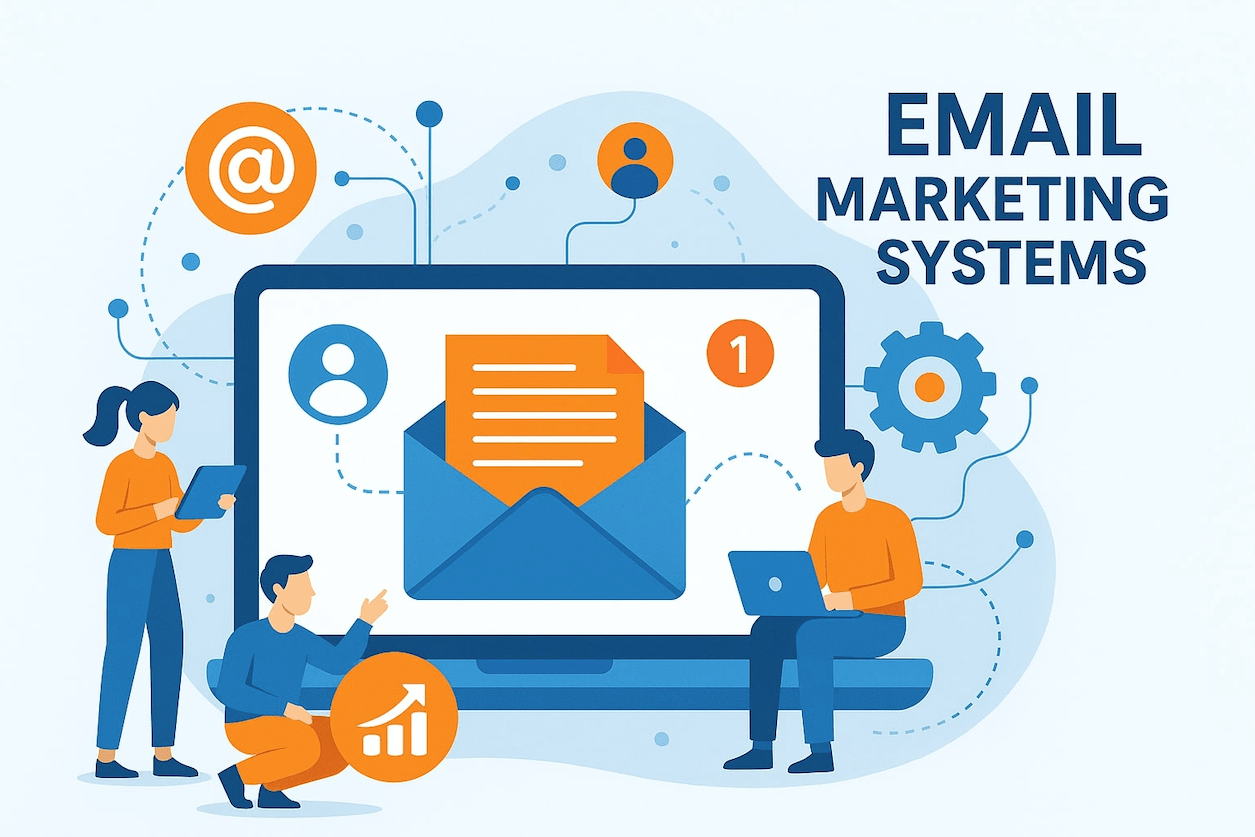
ESPs are digital platforms or software that make it easy to create, manage, and analyze email campaigns for the purpose of communicating with a target audience (i.e., customers or subscribers).
Some common ESPs are Mailchimp, MailerLite, and Brevo, all of which WP Fusion users often use. WP Fusion’s 2024 Year in Review goes over the percentage of users using these Email Marketing Systems.
#CRMs
In short, a CRM is a centralized place where all information about a customer or lead is stored. This includes contact details, interactions, and sales activity, just to name a few.

Having this kind of information about your customers enables you to track and manage data about your customers throughout the customer lifecycle.
As you can see, the central parts of a CRM are also in its name: CRMs organize and analyze the behavior of your customers, and this information helps you better understand and manage your relationship with your customers and their needs.
ActiveCampaign, FluentCRM, and HubSpot are some big names in the CRM world, and are often used by WP Fusion users. For more data on this, check out our 2024 Year in Review.
#How ESPs and CRMs Differ
#Central Features
At this point, it’s probably clear to you that Email Marketing Systems are more focused on the emailing part of running a business or website and Customer Relationship Management Systems are more focused on gathering information about the customer journey.
But let’s walk through the details of what this means.
Most ESPs are optimized for email sequences, tagging, and automation email workflows. Being able to automate workflows is no small feat, and it can save you a lot of time in the long run.
When we mention automated workflows, this mostly includes automated email campaigns. And ESPs can handle sending a lot of emails at once; think numbers in the millions.
Though some CRMs may have email marketing capacities, ESPs often include higher volume limits compared to CRMs, meaning they’re more suited to large-scale email marketing efforts.
On top of this, ESPs also have advanced infrastructure, authentication protocols, and relationships with mailbox providers to ensure high email deliverability rates.
And because ESPs are focused on sending emails, they also offer detailed analytics surrounding emails and email campaigns. This would include information on open rates, click-through rates, and conversion rates, as well as tools for optimizing email performance.
CRM’s on the other hand, are like an intelligence hub, and with this intelligence, CRMs optimize workflow processes beyond automated email marketing. This intelligence hub also includes data on your customers, and this data supports this optimization of workflow processes.
With a CRM there are a multitude of routine tasks that can be automated and simplified. These actions include automatically scheduling a task or reminder, updating the customer’s status in the sales pipeline, and, yes, sending a personalized follow-up email.
#Example Scenario
Sometimes it can be tricky to understand what all this means when you’re just starting out. So here’s a more concrete example:
Imagine you run a small landscaping business.

If you’re using a CRM and someone fills out a “Request a Quote” form on your website, there are a number of features that a CRM can automatically employ.
When someone submits a “Request a Quote” form on your website, a new contact will be created in your CRM with their info.
Then, they will be considered a lead and added to your sales pipeline under “New Inquiries.” (You might use WP Fusion’s tagging system to do this! But more on that later.)
Your CRM can then automatically assign the lead to a sales representative on your team and automatically set a task for the rep to call the lead within 24 hours.
When the rep logs the call, your CRM automatically moves the lead to the “Follow Up” stage of the sales pipeline.
Without a CRM, a manager would have to keep track of all this information and assign these tasks, so these automations save a lot of time.
An email service provider could send a welcome email to the lead, maybe add them to a monthly newsletter list, and track whether they opened or clicked the email.
However, an ESP would not be able to manage follow-up tasks, track the customer in the pipeline stages, or automatically coordinate who needs to do what next.
#Prices
Typically, ESPs are less expensive than CRMs. Both use monthly payment structures, and there are usually tiered membership levels.
For example, Mailchimp’s payment structure involves how many contacts you have.
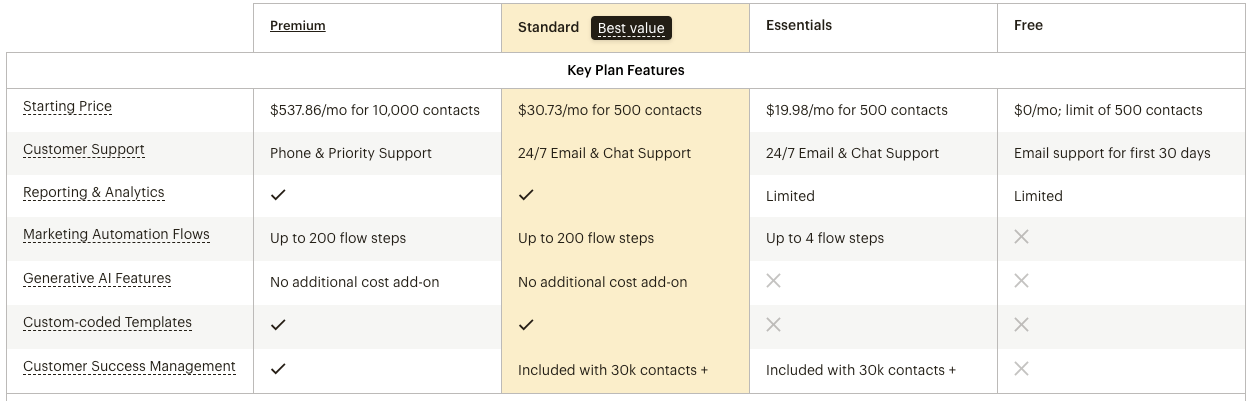
HubSpot’s payment structure has many different pricing options, including specific payment structures for Marketing, Sales, Service, and Content to name a few.
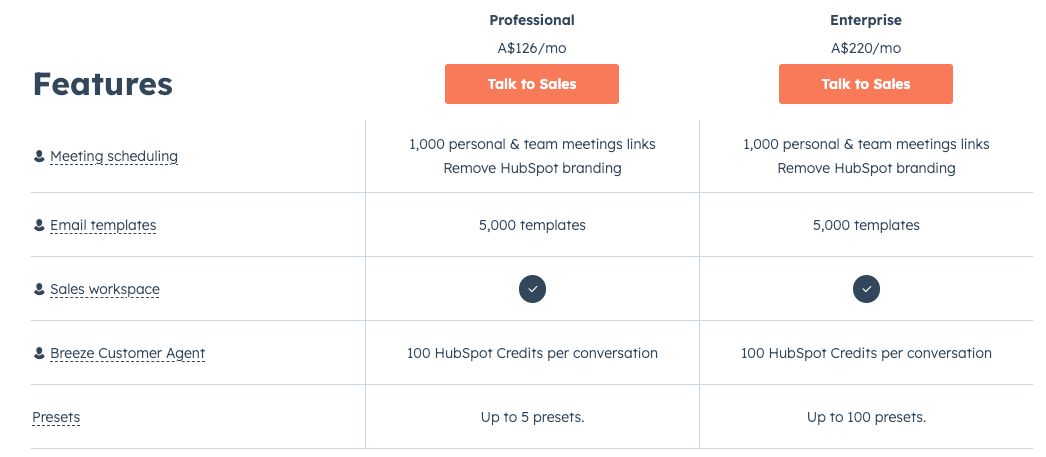
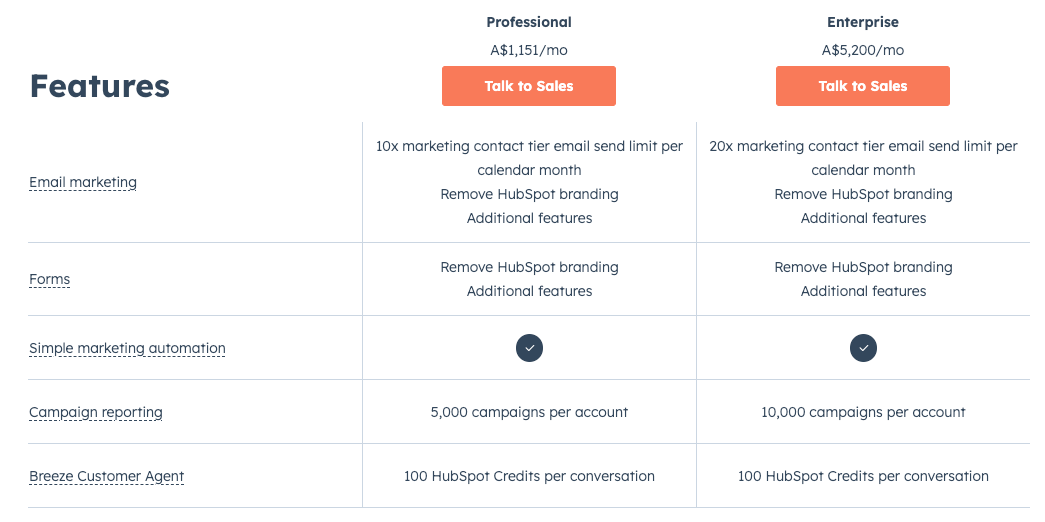
Clearly, the Marketing option is more expensive than some of HubSpot’s other options, and much pricier than Mailchimp’s payment structure.
My recommendation would be to check out the individual pricing structures of whatever ESP or CRM you’re considering, and consider what your budget and your needs 😎
#The Overlaps
There are a few areas where ESPs and CRMs overlap, which I’ve already alluded to in passing.
But I’m going to go over three major overlaps between the two tools and then move on to reviewing how WP Fusion can optimize your ESP or CRM.
Then, I’m going to go over what I call The In-Betweens. These are software that have a little bit of both – some ESP features and some CRM features. But let’s cover the similarities first.
#Contact Management
Customer data such as names, email addresses, phone numbers, company info, and engagement history are stored and organized in ESPs and CRMs.
This allows a business to segment its contact list by customer type and send targeted email campaigns. An ESP however, will focus on managing contact specifically for the purpose of marketing communication.
And a CRM will manage contacts more holistically, including for sales conversations, support tickets, purchase history and other interactions across the entire customer lifecycle.
#Analytics and Reporting
Both CRMs and Email Marketing Systems offer valuable insights. They track data and provide reports about your business and customers.
Therefore, both methods have the ability to show a business what is working and what is not, but, as mentioned earlier, the data they collect is different.
#Customer Segmentation
ESPs and CRMs both can segment customers in order to create targeted lists based on customer attributes or behaviors, including location, purchase history, and email opens.
But remember, the segmentation that most ESPs use is related to emails, and don’t include some of the advanced elements of customer segmentation that CRMs typically have.
The good news is, you can use WP Fusion to support your segmentation and optimize your workflow processes even more, whether you’re using an Email Marketing System or CRM.
#WP Fusion and ESPs and CRMs
So the first thing to note is that technically, WP Fusion functions the same for both ESPs and CRMs. However, users often use WP Fusion for slightly different purposes in an ESP than in a CRM.
When users integrate WP Fusion with their Email Marketing System, WP Fusion works to triggering automations and building segments, which, as stated above, has many advantages.
WP Fusion supports these automations and segmentation through tags to indicate events in WordPress, and then these indicated events trigger emails and engagements. Additionally, these tags, which indicate events and trigger emails, are based on where people are in the customer journey.
When integrating WP Fusion with a CRM, users are typically trying to get as much custom field and contact data from WordPress into the CRM as possible. And WP Fusion does a great job at syncing these contact fields between your CRM and WordPress site.
What’s more, because WP Fusion syncs your CRM and WordPress bidirectionally, all of the data in your CRM can be displayed in WordPress, too.
This custom field data is then used to track various analytics, which then indicate how users can score potential leads and allows them to run reports.
So while WP Fusion can still absolutely be used to trigger automations when integrated with CRMs, there’s more text data collection going on when WP Fusion supports CRMs.
#The In-Betweens 👻
Sorry to throw y’all a curveball into the upside-down of ESPs and CRMs, but there are a few ESPs that have CRM features, and some CRMs with more advanced ESP features.
These In-Betweens can be helpful to you as a user, but it makes it a little harder to separate ESPs and CRMs when you’re learning the technical info about each.
We’re not going to go into too much detail about these, but just to say that Brevo and ActiveCampaign are examples of these in-betweens.
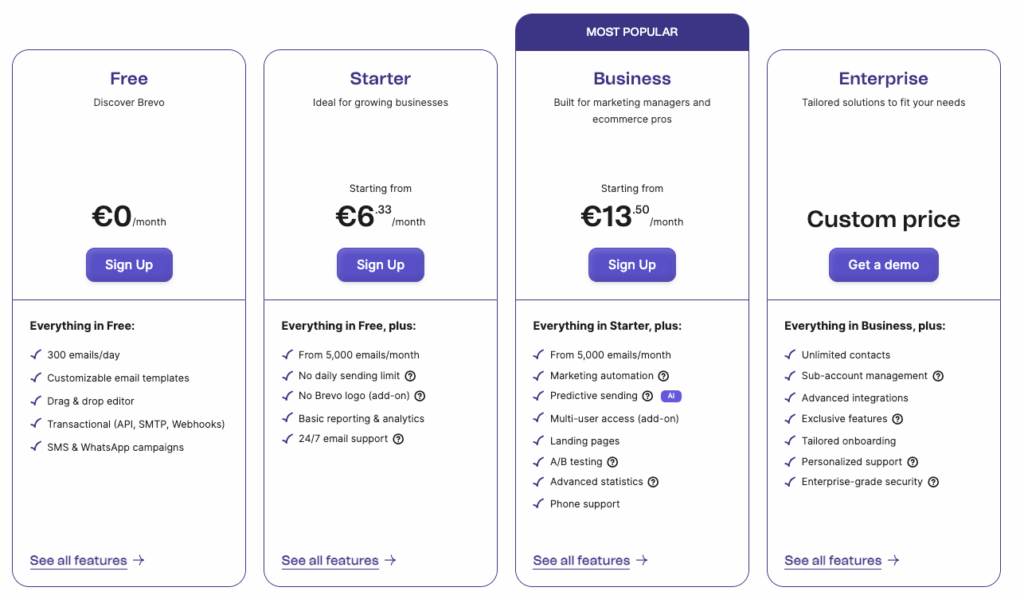
Brevo formerly was only an ESP and in 2021 they added some features that allow the plugin to function more like a CRM – but it’s a light CRM, so to speak.
Brevo’s pricing is hard to beat, and it’s a great place to start if your budget is a little lower and you’re looking for a ESP +some.
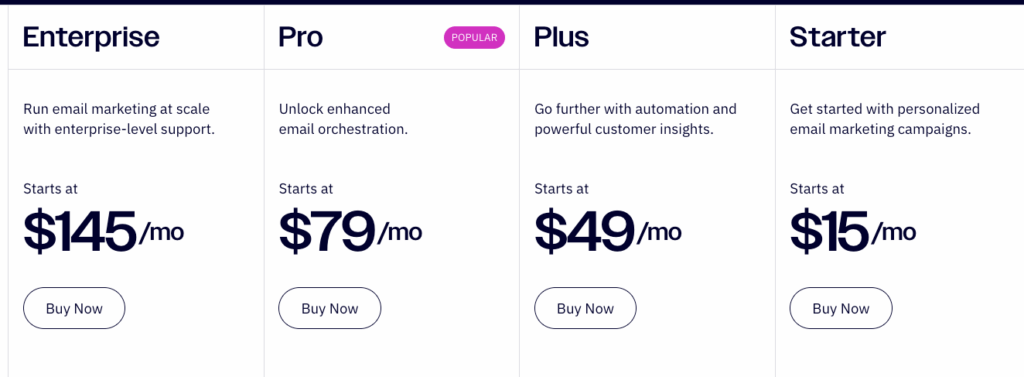
ActiveCampaign truly rolls the features of a CRM and an ESP into one. This means users can manage contacts, track deals, and automate sales processes, and create and send targeted email campaigns in the same platform.
Over 20% of WP Fusion users use ActiveCampaign, and you really get what you pay for. If you have the budget to start with ActiveCampaign, go for it, and you can consider upgrading later.
#Can I use an ESP and a CRM?
The short answer: yes, absolutely.
Overall, a CRM is like an intelligence hub that can capture, organize, and analyze every customer touchpoint.
An ESP can take this data and acts as the communication channel by sending out targeted newsletters and/or promotional offers based on this intelligence gathered by the CRM.
With both, you can streamline the business process in many ways that can optimize your customers’ experience even more. But you don’t need both.
#Wrapping Up 🎁
So there you have it – our very thorough explanation of the similarities and differences between ESPs and CRMs.
ESPs are great if you just want to focus on email campaigns and CRMs focus more on the analytics of the whole customer journey.
CRMs ultimately have more functions than ESPs, but you can find CRMs with ESP capacities and ESPs that work as light CRMs, too.
If you’re wondering which CRMs integrate the best with WP Fusion, you can check out our documentation on CRM compatibility.
Drop a comment below if this post helped your understanding, or if you have any feedback!
#Glossary
Click-through rate (CTR) – A click-through rate (CTR) is the percentage of people who click on a link or call-to-action within an email or ad compared to the total number of recipients or viewers.
Customer lifecycle/journey – refers to the stages a customer experiences in their relationship with a business, typically including awareness, consideration, purchase, retention, and advocacy.
Email campaign – A coordinated series of emails sent to a targeted group of contacts with the goal of promoting a product, service, event, or message. These campaigns are often scheduled and automated to drive engagement, build relationships, or generate conversions.
Lead – a potential customer who has shown interest in a company’s product or service, often by providing contact information or engaging with marketing content.
Upside-down – Stranger Things reference.
Workflow processes – structured sequences of tasks or activities that are carried out to complete a specific business goal efficiently and consistently.