If you’re looking to build a WordPress-powered community, membership site, or online course platform, BuddyX Theme is a lightweight option worth considering.
Designed specifically for use with community plugins like BuddyPress and the BuddyBoss Platform, it offers everything you need to create user profiles, groups, activity feeds, and more, without the high cost.
BuddyX is free to start, easy to customize with popular page builders, and compatible with major plugins like LearnDash, WooCommerce, and GamiPress.
When paired with 🧡WP Fusion🧡, it becomes even more powerful by adding advanced automation, CRM syncing, and content protection directly inside WordPress.
In this review, we’ll explore what BuddyX has to offer, how it compares to other options, and how WP Fusion helps you build a smarter and more efficient community experience.
#🤔 What is the BuddyX Theme?
BuddyX is a free WordPress theme developed by Wbcom Designs, designed specifically for building online communities using BuddyPress or the BuddyBoss Platform. It includes all the essentials for launching a modern community-driven website, such as user profiles, activity streams, private messaging, groups, and member notifications.
Here’s a look at our demo membership site built using the BuddyX theme and the BuddyPress plugin.
A user profile –

Members’ activity page –

Groups page –

The theme is lightweight, responsive, and ready to use with popular page builders like Elementor and Gutenberg, making it easy to customize your site. It also integrates smoothly with major WordPress plugins, including WooCommerce, LearnDash, LifterLMS, TutorLMS, WP Job Manager, GamiPress, and bbPress.
Whether you’re building a niche membership site, online learning platform, or job board, BuddyX provides a solid and flexible foundation. It supports a variety of use cases and gives you the freedom to shape your community site to match your goals.
#📋 BuddyX Theme Features at a Glance
BuddyX is built to help you launch and grow a fully functional online community with minimal setup. The theme includes a wide range of features that support speed, flexibility, and ease of use.
Here are some of the standout features you’ll find in BuddyX:
- One-click demo import to get your site up and running quickly
- Advanced theme customizer with live preview for easy branding
- Elementor and Gutenberg support for drag-and-drop design
- Integrated BuddyPress widgets to improve the community user experience
- WooCommerce compatibility for building an online store
- LMS plugin support, including LearnDash, TutorLMS, LifterLMS, and Sensei LMS
- GamiPress integration for adding badges, points, and rewards
- bbPress support for forums and discussions
- RTL and translation-ready, making it ideal for multilingual sites
- Multiple header variations and sticky menus (Pro version only)
- Optimized for mobile devices with clean menus and layouts
With these features, BuddyX offers the flexibility to support a wide range of community-driven WordPress sites while keeping performance and usability in mind.
#💰 BuddyX Theme Free vs Pro: What’s the Difference?
The free version of BuddyX includes everything you need to launch a basic WordPress community site. For many users, especially those starting out, this version offers more than enough to get a functional site up and running.
The BuddyX Pro version, however, unlocks additional design options and deeper plugin integrations. It includes features like sticky headers, extra header and menu styles, advanced blog layouts, and full compatibility with tools like LearnDash, TutorLMS, LifterLMS, WooCommerce, and Dokan.
These enhancements make it easier to create a professional-looking site with advanced functionality, especially if you’re running an online course, membership site, or social marketplace.
Pricing for BuddyX Pro starts at $79 per year for a single site. You can also choose a five-site license at $119 per year, or invest in a lifetime license starting at $199.
#🆚 BuddyX vs BuddyBoss: How They Compare
Both BuddyX and BuddyBoss are designed to help you build powerful WordPress community sites. Both BuddyX and BuddyBoss are built to support community features in WordPress. They work with the same underlying technology, such as BuddyPress or the BuddyBoss Platform, to add features like user profiles, groups, activity feeds, and messaging. However, they take very different approaches when it comes to design, pricing, and overall structure.
BuddyBoss is an all-in-one platform that includes both a theme and a tightly integrated community plugin. It comes with pre-built layouts, custom design components, and native support for features like groups, profiles, messaging, and course integration. Pricing starts at $299 per year and is ideal for users who want a ready-made community experience with minimal setup.
BuddyX, on the other hand, is a standalone WordPress theme. It is free to start and gives you more flexibility to choose your own stack. To build a membership site, job board, or online course platform with BuddyX, you’ll need to pair it with compatible community plugins like BuddyPress or the BuddyBoss Platform. This modular approach is perfect for users who prefer to customize their site using Elementor, third-party plugins, and their own design choices.
Choose BuddyBoss if you want a bundled solution that works out of the box. Choose BuddyX if you prefer a budget-friendly, theme-first approach that gives you full control over how your community site is built and expanded.
| Feature | BuddyX Theme | BuddyBoss |
| Price | Free & Pro starts at $79/year | Starts at $299/year |
| Design Approach | Modular and flexible, customizable with page builders | Fixed layout with pre-styled templates |
| Page Builder Support | Elementor and Gutenberg | Gutenberg, limited page builder flexibility |
| Plugin Compatibility | Works with LearnDash, WooCommerce, GamiPress, and more | Native integration with LearnDash and WooCommerce |
| Community Features | Powered by BuddyPress or BuddyBoss Platform | Built on BuddyBoss Platform |
| Customization Level | High, build your layout with widgets and sections | Low, follows a predefined structure |
| Ideal For | Developers, DIY site owners, and budget-conscious users | Site owners who want a ready-made, all-in-one solution |
#💪 Using WP Fusion With BuddyX Theme
BuddyX gives you a solid foundation for building social and membership sites. When you add WP Fusion, you get the ability to connect that community with your CRM and automate nearly every part of the user journey.
WP Fusion lets you sync user profiles, tags, and activity from your BuddyX-powered site directly into your CRM. You can track logins, page views, course progress, and form submissions, then trigger CRM automations or email sequences based on those actions. This makes it easy to manage members, personalize communications, and protect content – all from inside WordPress.
For example, you can:
- Auto-enroll users into BuddyPress groups by applying a tag in your CRM
- Restrict content or courses to users with specific tags, like Free Member or Email Confirmed
- Send targeted emails when someone joins a group, completes a quiz, or earns a badge
- Track user behavior like login activity, page views, and form submissions for better segmentation
Popular use cases include:
- Niche membership communities, such as coaching groups or private mastermind forums
- Online course platforms that combine LMS tools with a social experience
- Gamified learning environments using GamiPress and WP Fusion to reward and segment users
- Freemium content sites where access upgrades are handled automatically based on email tags
- Job boards or professional directories where users are segmented by role, activity, or group
By connecting BuddyX with WP Fusion, you gain the ability to build a smarter, more automated community platform without needing custom code or relying on third-party SaaS tools.

#🛠️ Setting Up BuddyX Theme With WP Fusion
Let’s say you want to create a membership site with the BuddyX theme, the BuddyPress community plugin, and WP Fusion. This setup gives you full control over your site’s design, community features, and CRM-powered automation.
You’ll use BuddyX to handle the layout and styling, BuddyPress to add community functionality like profiles and groups, and WP Fusion to sync user data with your CRM, apply tags, and automate engagement.
The good news is that getting everything connected is straightforward, and you can start with the free versions of each tool before scaling up as needed.
#Step 1: Install the BuddyX Theme + Optional Demo Import
Install and activate the free BuddyX theme on your WordPress website.
Once installed, you can either set up your site manually by adding your own pages, menus, and plugins, or use the optional demo importer plugin to speed things up. The demo installer lets you create a fully functional community site in minutes, so you don’t have to start from scratch, but it’s optional.

#Step 2: Install WP Fusion and Connect to Your CRM
If you’re just getting started, WP Fusion Lite (the free version) lets you sync user registrations and profile updates with your CRM, control content access using tags, track site activity, and personalize content with shortcodes.
For advanced features like syncing with plugins such as LearnDash, WooCommerce, or BuddyPress groups, you’ll need the premium version. It unlocks 100+ plugin integrations, deeper automation, and advanced tagging based on specific user actions. You can start with the free version and upgrade anytime without losing your settings.
Install and activate the WP Fusion plugin. After that, go to Settings → WP Fusion, choose your CRM, and authorize the connection. If you’re using HubSpot, for example, you’ll be redirected to your HubSpot account to select your domain and authorize access.

Although this guide demonstrates using HubSpot, you can connect WP Fusion with any supported CRM, including ActiveCampaign, Mailchimp, FluentCRM, ConvertKit, Zoho, Keap, and dozens more. Once connected, WP Fusion will sync user data and activity between WordPress and your CRM.
Profile updates, logins, and other activity will be tracked in real time, giving you a complete view of each contact inside HubSpot.
WP Fusion uses static lists in HubSpot for segmentation, and also supports multiselect fields if you need more than the default list limit. You can use this data to trigger automations, personalize emails, or unlock gated content.
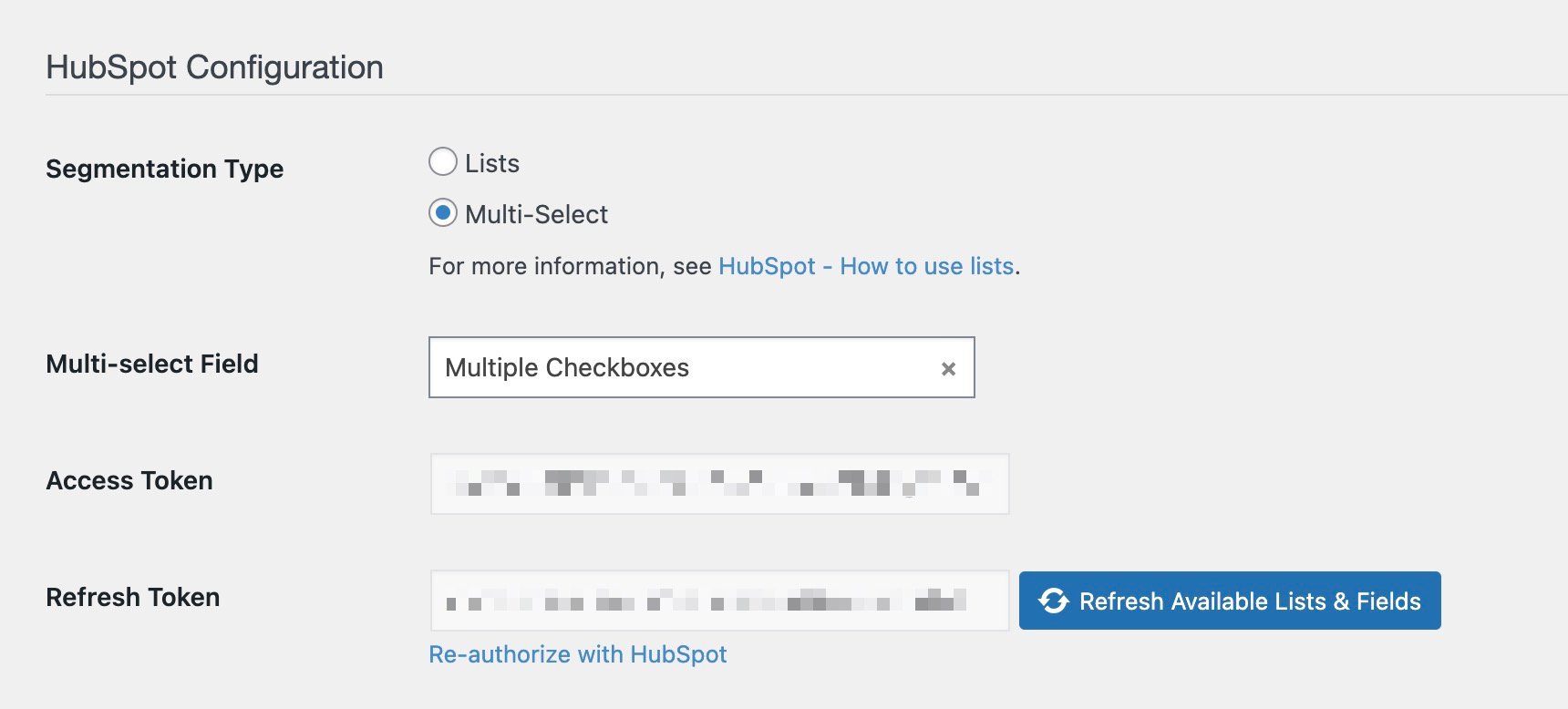
With site tracking enabled, page views and interactions are logged to each contact’s timeline. You can also send activity-based events like group joins or profile updates (available in the premium version).

If you’re using HubSpot Marketing Hub, remember to mark synced users as marketing contacts so they’re eligible for emails and ads.
Check out our detailed guide on connecting HubSpot with WordPress. For all other CRMs, refer to our WP Fusion documentation for setup instructions specific to your platform.
#Step 3: Install & Set Up BuddyPress (or Any Supported Community Plugin)
BuddyX is built to work with BuddyPress, a free community plugin that powers profiles, activity feeds, groups, and messaging. But you’re not limited to it. WP Fusion also supports BuddyBoss Platform and works alongside other membership and community tools.
Once you activate BuddyPress, WP Fusion will unlock additional settings for syncing and automation.
WP Fusion allows site owners to sync BuddyPress profile fields with their CRM. When users update their profiles, those changes are automatically reflected in their CRM contact records.
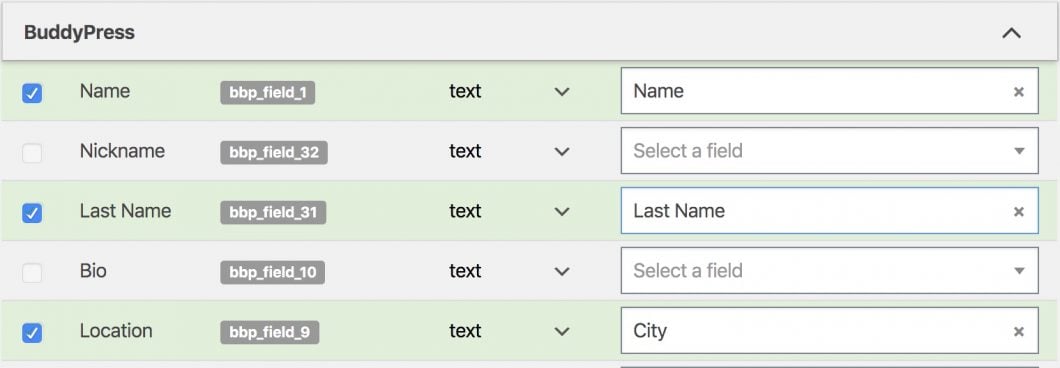
Tags are applied or removed when users join or leave groups, keeping CRM segmentation in sync with user behavior on your site. It’s also possible to restrict group access using tags, ensuring that only the right users can see or interact with specific community spaces.

When a profile is completed or key fields are updated, WP Fusion can trigger email sequences or automations in your CRM, helping you engage users at the right time. Important actions like joining a group or updating a profile photo are tracked and recorded, giving you valuable data inside your CRM for segmentation or lead scoring.

For existing communities, WP Fusion offers batch processing tools to sync current user and group data with your CRM in just a few clicks.
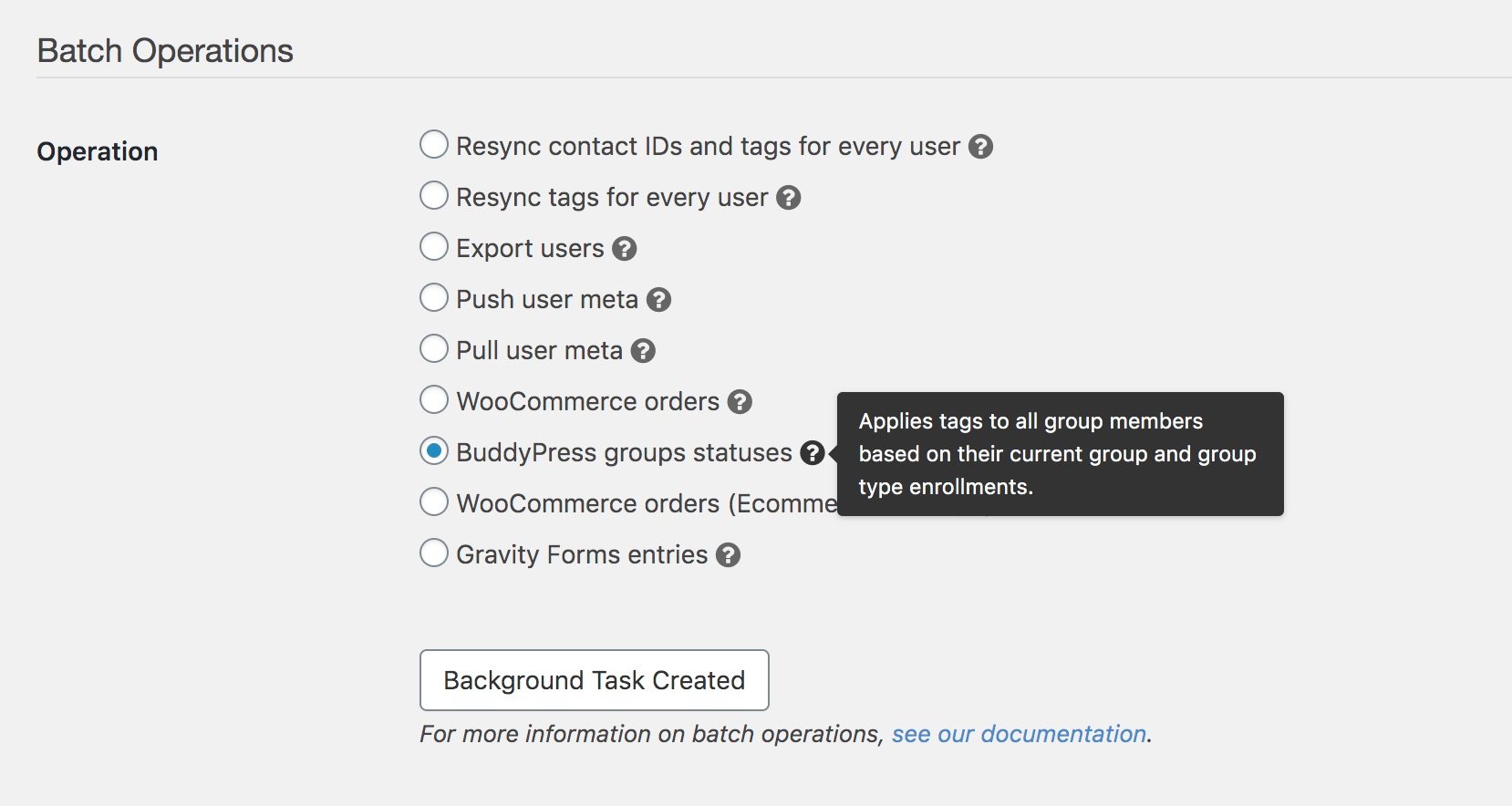
All of this gives you complete control over how your WordPress community connects with your CRM, whether you’re using BuddyPress, BuddyBoss, or another community plugin entirely.
Need help? See this help doc: BuddyPress & WP Fusion integration.
#👉 Conclusion
If you’re looking to build a modern, flexible, and affordable WordPress community site, BuddyX Theme is a strong starting point. It’s lightweight, easy to customize, and integrates smoothly with popular plugins for LMS, ecommerce, and social features.
Whether you want to build a membership portal, online course hub, or niche network, BuddyX gives you the tools to do it without relying on bloated or expensive solutions. Pairing BuddyX with WP Fusion takes your site even further.
You can connect your WordPress users to your CRM, automate onboarding and engagement, control access to content using tags, and track key user activity across your community. Best of all, you can start with free versions of both BuddyX and WP Fusion Lite. As your site grows, upgrade when you need more advanced features.
For WordPress users who want control, flexibility, and smart automation, BuddyX + WP Fusion is a winning combination.