
#Overview
Using WP Fusion you can track events from supported plugins in Klaviyo.
#How it works
When an event is tracked in a supported plugin, it will be recorded to the WP Fusion activity logs, and sent to the corresponding person’s contact record in Klaviyo.
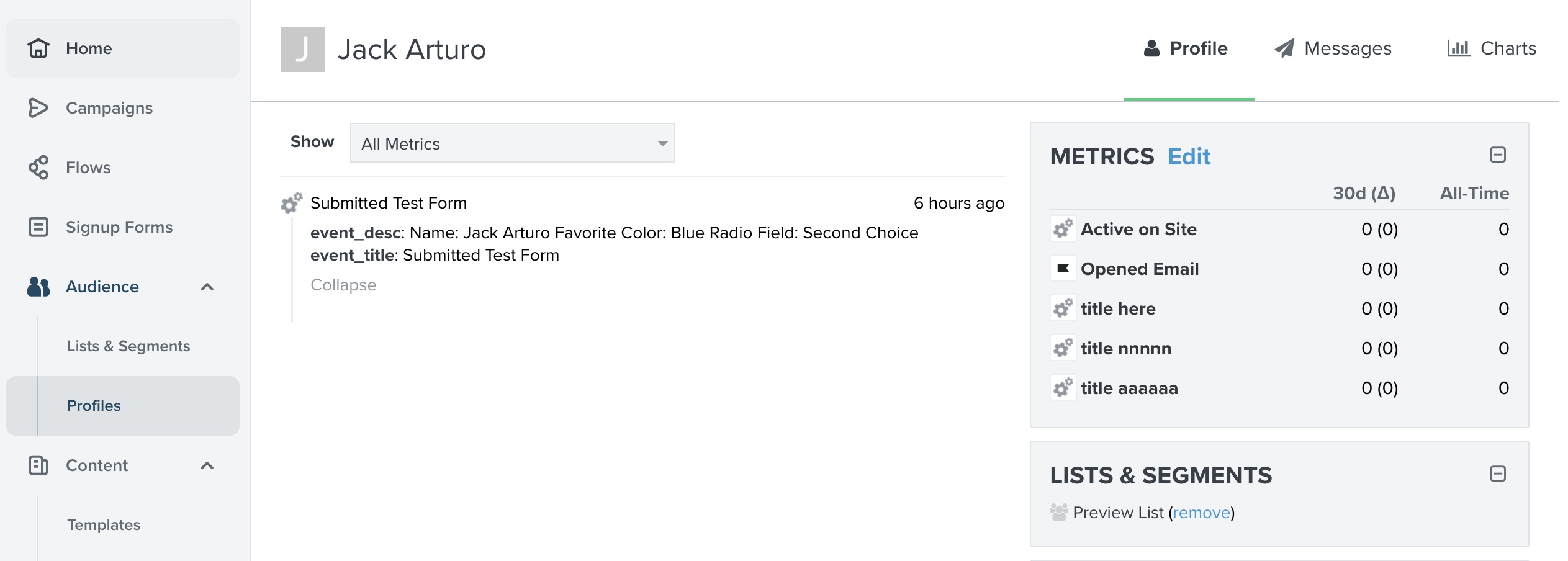
Tracked events will then show up in that contact’s Metrics events timeline.
#How it looks
Events are displayed on the Metrics timeline on Klaviyo subscriber records.
#Using event tracking for enhanced ecommerce data
Klaviyo uses the events system for tracking orders and ecommerce activity. According to the Klaviyo documentation, to track orders in WooCommerce or another ecommerce plugin, you will need to set up two events:
- Placed Order: This event must be titled Placed Order and contain at minimum a
valuefield set to the total value of the order. In WP Fusion this uses the “Order Placed” trigger. - Ordered Product: This event must be titled Ordered Product and contain at minimum a
valuefield that represents the total cost of the item. In WP Fusion this uses the “Purchased Product” trigger.

Was this helpful?
Let us know if you liked the post. That’s the only way we can improve.